SSH broke?
Fix it from the couch.
SSH on a rooted LG TV breaks in a handful of ways: a keys file with Windows line endings, a private key pasted by mistake, the alpine password gone after the first key, a host key warning after a reset. SSH Doctor finds out which one, in plain words, and fixes it with the remote. It runs through the Homebrew Channel, not over SSH, so it still works when SSH is completely broken. It also pairs a key from your phone or computer with a short code, and lets you set your own password, switch to keys only or move SSH to another port, all kept after a restart. It can bring SSH back by itself after a restart, tell you if your router exposes it to the internet, and save your setup to a USB drive for after a reset. Use Entware's OpenSSH or dropbear instead? It checks that too.
Sound familiar?
The common ways SSH breaks on a rooted LG TV. None of them needs a factory reset.
Check, fix, pair.
Every repair says what it will change and keeps a dated backup first.
The check
Whether SSH is on in the Homebrew Channel and really running on its port, how you can log in (password, keys, or nobody), whether authorized_keys is usable, telnet as a way back in, failsafe mode, and the TV's own key fingerprints.
One button per fix
Turn SSH on now without a restart, Fix my keys file (line endings, hidden characters, wrapped and PuTTY keys, private keys, permissions), Go back to password login for anyone locked out, and Undo a change.
Pair a key by code
Scan the QR on the TV, type the short code, and send a key you have or let the browser make one. The private key never leaves your phone or computer.
Entware's SSH too
When Entware's OpenSSH or dropbear is how you log in, it counts as your SSH and gets checked: its settings, root login, whether a password works there, host keys, its port and starting at boot. It also spots Developer Mode's SSH on 9922, and only ever changes the Homebrew Channel's server.
Works over telnet too
ssh-doctor.sh runs on its own, for when telnet is the only way in: status, fix-keys, password-on and the rest.
SSH settings that stick.
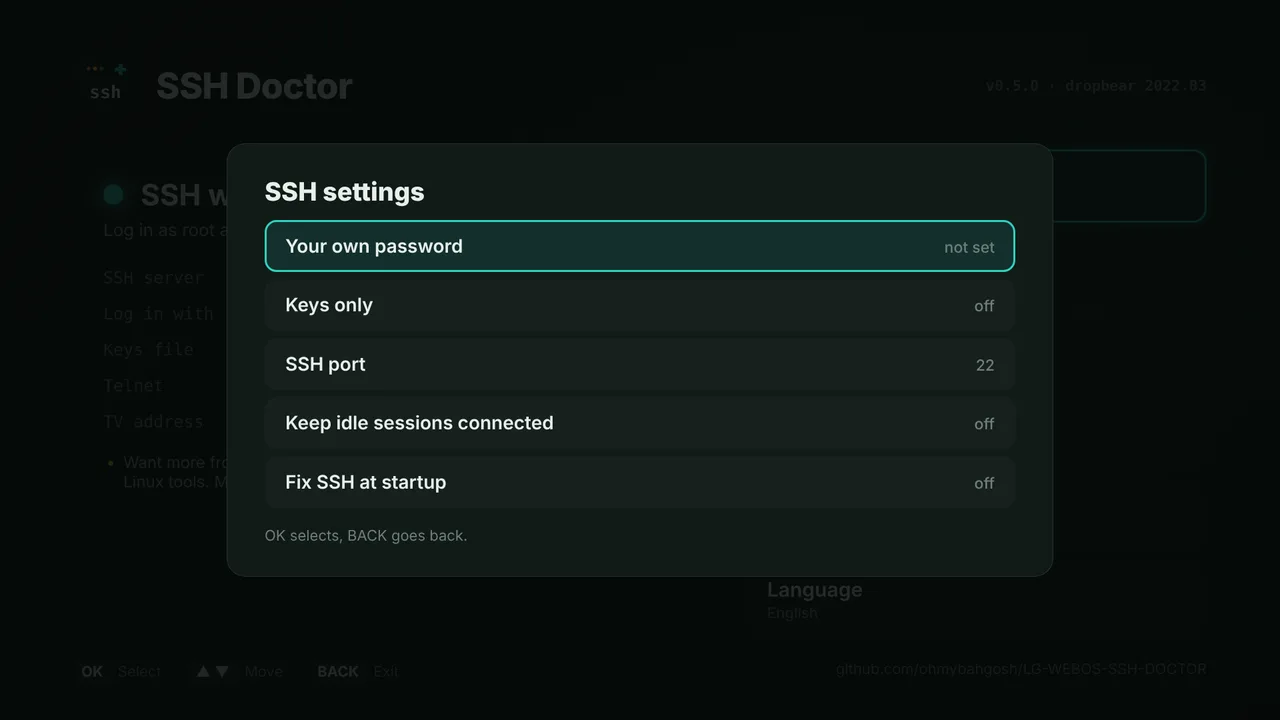
dropbear has no settings file: its options are set when it starts, and the Homebrew Channel starts it with none. SSH Doctor keeps yours and puts them back after every restart, with a small startup script in /var/lib/webosbrew/init.d.
Your own password
Typed on the TV, or on your phone through the pairing page. It's turned into a SHA-512 crypt hash first, so the password itself is never sent over your network or saved on the TV, and applied the way the Homebrew Channel applies alpine.
Keys only
Passwords stop logging in. It won't turn on until a key is on the TV, and Go back to password login undoes it if you lose the key.
Another port
2222, 22022 or any free port. The old port stays open until you've logged in on the new one and keep it, and if dropbear won't start there, SSH goes straight back.
Keepalive and reset
A keepalive every 30 seconds so routers don't drop quiet sessions, and Reset to Homebrew Channel defaults removes all of it, the startup script too.
Who's been logging in?
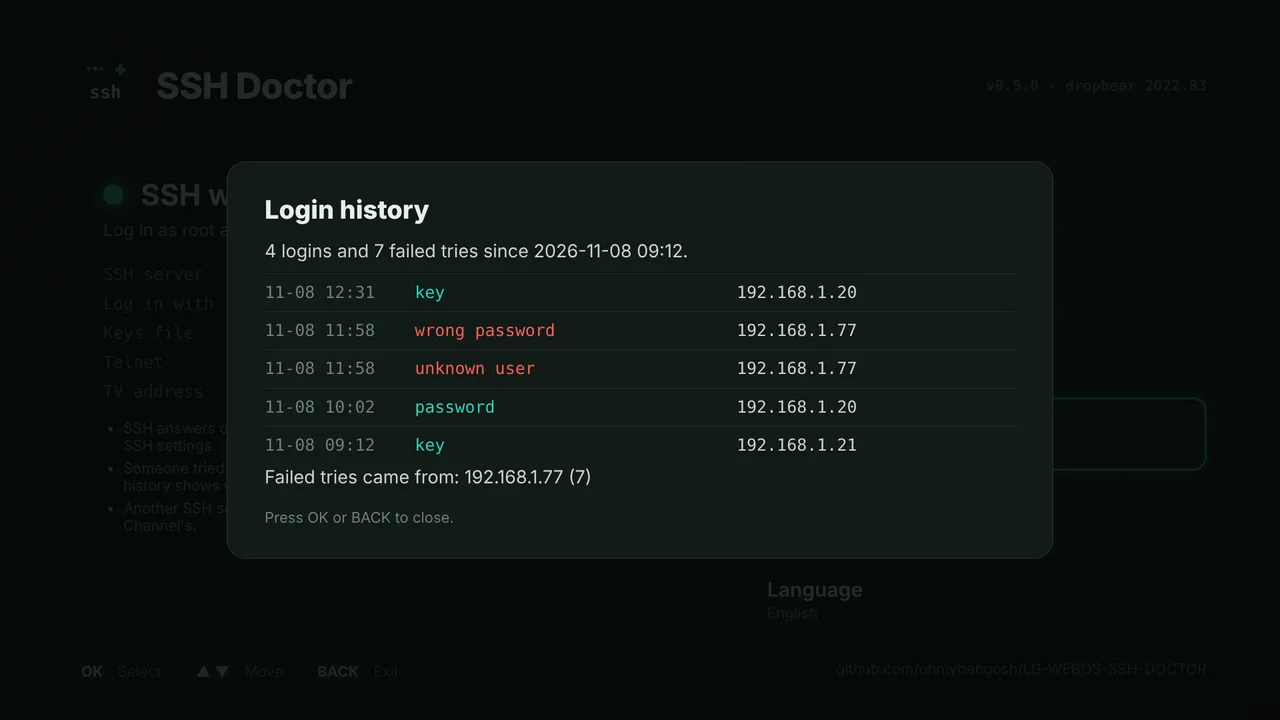
Recent logins and failed tries from the TV's own log, with a warning when the tries come from outside your home network.
Keys on this TV
Each key with its name, fingerprint and when it last logged in. Rename or remove one, with a backup.
The TV's own keys
Fingerprints to check a first login against, or make new ones if they're broken.
Telnet off
The Homebrew Channel's telnet lets anyone on your network in as root with no password. Turn it off once SSH works, or back on.
Report for help
A QR code with a short report, no addresses, keys or names in it, ready to paste into a GitHub issue or a forum post.
Copy it on your phone.
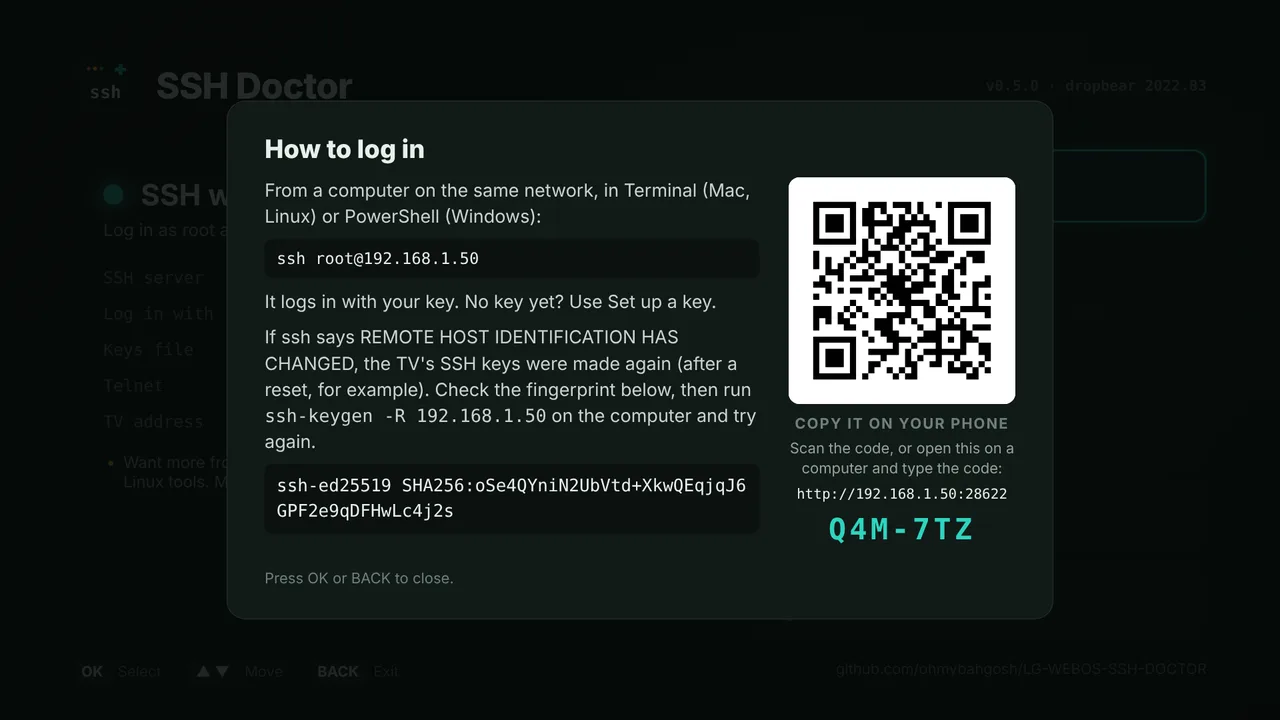
No typing long commands off the TV. The screens with something worth copying show a QR code beside it.
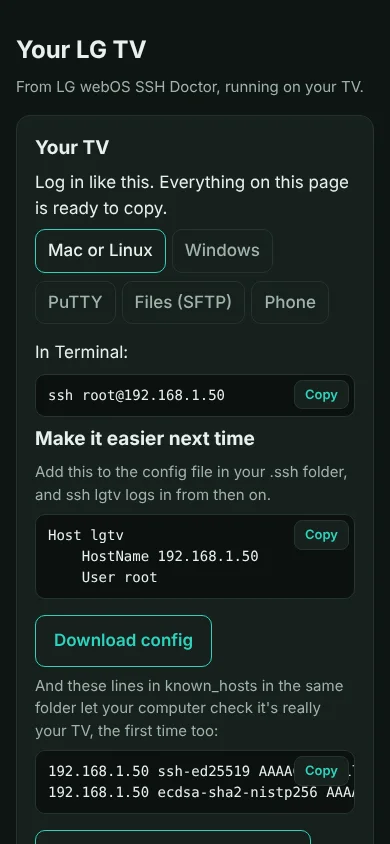
Everything, one tap each
How to log in, Report for getting help and the TV's fingerprints open a read-only page on your phone: the login command for Mac, Linux, Windows, PuTTY or SFTP, Open in an SSH app, the ssh-keygen -R line for a changed host key, an SSH config and the keys that can log in. It stops when that screen closes.
Update from the app
Each time it opens, SSH Doctor checks GitHub for a newer release. Update to v… shows what's new and installs it through the Homebrew Channel, which checks the download's SHA-256 first. The app opens again by itself and shows what changed.
File transfer, key or password
File transfer says how to log in from WinSCP, FileZilla or Cyberduck: with your key (and where each one takes it), alpine or your own password. The address shown is the main connection's, so a wired eth0 comes before Wi-Fi.
Back by itself, closed to the internet, saved for later.
Three things that matter most right after a restart, a reset, or when the TV can be reached from outside.
Fix SSH at startup
Turn it on in SSH settings and, after every restart, SSH Doctor checks that SSH came up. If it didn't, it starts it, and fixes keys file permissions dropbear would refuse. The main screen says when it had to. It never touches a port another program has.
Reachable from the internet?
Each time the app opens, it asks your router (UPnP, the way games open ports) whether it forwards the TV's SSH or telnet to the internet. If it does, Close it on the router takes those forwards off. Telnet, root with no password, is flagged first.
Save or restore my setup
Your keys, the TV's own SSH keys, settings and password hash on a USB drive. After a factory reset and rooting again, put them back: logins work as before, and computers don't warn REMOTE HOST IDENTIFICATION HAS CHANGED.
Get more from SSH
No Entware on the TV yet? SSH Doctor points to it: bash with history and tab completion, tmux to keep work running after you disconnect, nano, vim, htop, git, rsync and hundreds more packages, from the same Homebrew Channel repo.
No copying keys around.
The pairing page only runs while its screen is open on the TV, and nothing changes until you press OK on the remote.
Choose Set up a key
The TV shows a QR code, an address on port 28622 and a short code like K7F-3QX.
Scan it and type the code
On the phone or computer you'll log in from. Five wrong tries get a new code, and three rounds close the page.
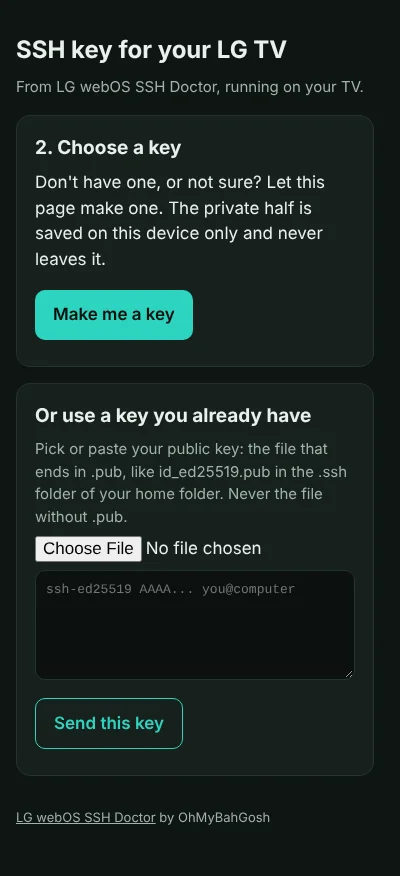
Send a key, or make one
Upload the .pub file you have, or let the browser make an ed25519 key pair. Only the public half goes to the TV.
Check the fingerprint, press OK
The page then shows the exact command for Mac, Linux, Windows, PuTTY, SFTP or a phone app, plus a ready-made ~/.ssh/config entry and the TV's known_hosts lines.
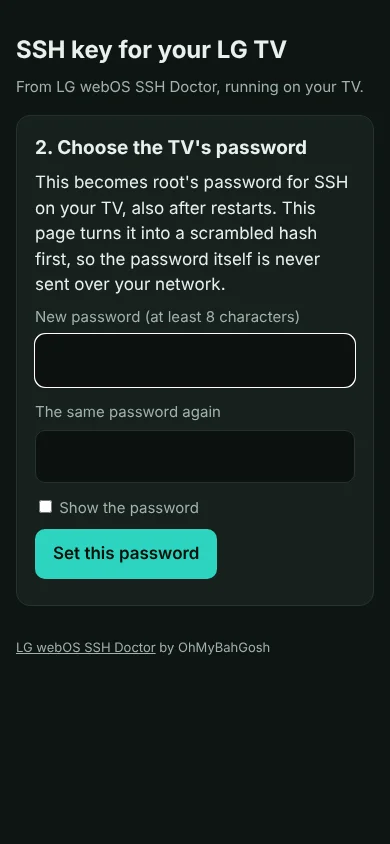
Install it from the Homebrew Channel.
Add this repository once and SSH Doctor shows up in the Homebrew Channel's app list, next to TiviBro, LG-USB-2-ETH0 and Entware. New releases appear there as updates.
https://ohmybahgosh.dev/repo
Open the Homebrew Channel's settings
Open the Homebrew Channel and select the gear icon at the top right.
Add the repository
Scroll to Repositories, choose Add repository, enter https://ohmybahgosh.dev/repo and select Add repository.
Install, then open it
Go back to the app list, install SSH Doctor and open it. It needs root, which the Homebrew Channel already has.
Or install the IPK yourself: org.ohmybahgosh.sshdoctor_*.ipk is attached to every release.
Over telnet.
The script inside the app works on its own, which helps when telnet is the only way in.
S=/media/developer/apps/usr/palm/applications/org.ohmybahgosh.sshdoctor/assets/ssh-doctor.sh
sh $S status            # what's wrong, in plain words
sh $S ssh-on            # turn SSH on and start it now
sh $S fix-keys          # repair authorized_keys and its permissions
sh $S password-on       # back to user root, password alpine
sh $S set-port 2222     # then: port-keep, or port-revert
sh $S reset-settings    # back to the Homebrew Channel's defaults
sh $S entware           # Entware's OpenSSH and dropbear, checked
sh $S set-bootfix on    # check SSH at every start
sh $S exposure          # does the router forward SSH or telnet?
sh $S kit-save          # save to a USB drive; then kit-restore
sh $S update-check      # a newer release?  then update-install
sh $S report            # a report for asking for help
sh $S help              # everything else
Exactly what it changes.
Only when you press a button, with a backup first. System partitions are never written.
| path | what |
|---|---|
/home/root/.ssh/authorized_keys | Repaired, added to, or set aside, always with a dated .ssh-doctor-* backup next to it |
/etc/shadow | Never written: root's password goes through a bind-mounted copy in /tmp, the way the Homebrew Channel sets alpine |
/var/lib/webosbrew/ssh-doctor | Your SSH settings, and your password's hash (readable by root only) |
/var/lib/webosbrew/init.d/60-ssh-doctor | Startup script that restarts the Homebrew Channel's dropbear with your settings. Only there while a setting is on |
/var/luna/preferences/webosbrew_* | The Homebrew Channel's own SSH and telnet switches, only when you turn them on or off |
/var/lib/webosbrew/sshd | The TV's host keys, only if you make new ones or put saved ones back (backed up first) |
/tmp/usb/…/ssh-doctor-kit | Your saved setup, only when you save one to a USB drive. It holds the TV's private SSH keys, so keep the drive safe |
| your router | Asked which ports it forwards (UPnP). Only Close it on the router changes it, and only the forwards to this TV's SSH or telnet |
| the app itself | Updated only when you choose Update to v…, through the Homebrew Channel, which checks the download from GitHub against its SHA-256 first |
/opt/etc | Entware's SSH settings, host keys and password file: only read, never changed. OpenSSH is asked for its settings with sshd -T, which only reads them |
Questions.
I added a key and now alpine doesn't work. Is something broken?
alpine on when there's no keys file. If the key doesn't work either, open SSH Doctor and choose Fix my keys file, or Go back to password login.Can I lock myself out with the settings?
Does my password go over the network?
I use Entware's OpenSSH. Will it touch that?
/opt/etc/shadow), its host keys, its port, and whether Entware starts at boot. Set up a key works for it too, since it reads the same keys file.Can I copy the login command on my phone instead of typing it?
How do I update SSH Doctor?
Was this written by AI?
Release notes.
Every release and what changed, pulled from GitHub automatically.
loading releases…